
What Is a Learning Management System (LMS)?

Online learning has made learning far more flexible. You can do your classes from home, access your learning materials via your phone and hand in your assignments without having to go to a classroom at all. The question then becomes how do the providers actually put all of that together and monitor the progress of the students?
This is where a Learning Management System (LMS) comes in handy.
An LMS enables schools, universities, training centres and the like to manage learning via a single digital platform. It brings lessons, learning materials, assignments, assessments and student information all together.
What Is a Learning Management System?
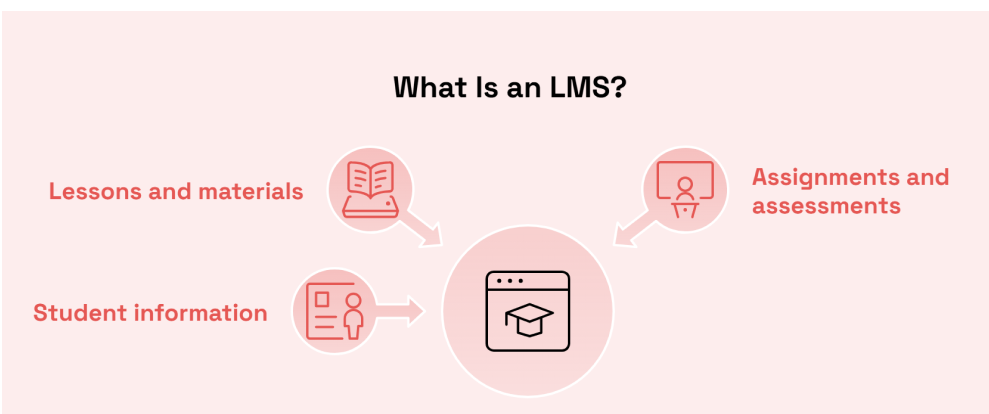
A Learning Management System (commonly known as an LMS) is software which is used to create, deliver, manage and track courses and training.
It provides a central point where both students and teachers can go to access the resources they need.
For example, a student joining an online course at a training organisation wouldn't be getting their lesson notes via email, their assignments via WhatsApp and their announcements via a separate set of messages. All of that would be available on one platform.
An LMS may allow students to:
- View course materials and recorded lessons
- Download notes and learning resources
- Submit assignments
- Complete online quizzes
- Check assessment results
- Receive course announcements
- Communicate with teachers or tutors
- Monitor their learning progress
Teachers and administrators can also use the same system to set up courses, manage students and monitor learning.
Although LMS platforms are widely used for online education, they are not limited to online courses. Schools, universities and training institutes can also use them to support classroom teaching and blended learning.
How Does an LMS Work?
An LMS works by bringing the learning activities and the course information into one system. Students, teachers and administrators all log in to the system using their own credentials and have different levels of access depending on their role.
Here is a simple example of how an LMS works:
1. Course creation
A teacher or course administrator sets up the course and adds in the relevant content (topics, learning materials, assignments, assessments etc).
2. Student enrolment
Students are added to the course and given access to the relevant learning resources.
3. Accessing lessons
Students log in to the platform to view the lessons, download the notes, watch the videos and complete the learning activities.
4. Completing assessments
Students submit their assignments, take their quizzes and complete other assessments via the platform (depending on how the course is structured).
5. Tracking progress
Teachers can look at the submissions, give feedback and track student progress. Students may also be able to view their own results and the activities they've completed. This keeps the course activities running smoothly and makes it much easier for all concerned to find out what's going on.
What Are the Main Features of an LMS?

Not every LMS offers the same features. Some platforms are designed for schools and universities, while others focus on professional training or online courses.However, most LMS platforms include several common features.Not all LMS's are created equal. Some are clearly aimed at the school/university market, others are aimed at the professional training or online course market.However the vast majority of LMS platforms will have a number of standard features.
1. Course Management
Course management enables teachers and administration to create and manage courses.They can arrange lessons by topic, upload the learning materials and give the students access to the relevant resources.
2. Learning Materials
An LMS can store different types of learning content, including:
- PDF notes and documents
- Presentations
- Recorded video lessons
- Audio files
- E-books
- Links to useful learning resources
Students can access the materials via the platform when they're available.
3. Assignments and Assessments
Teachers will be able to create assignments, quizzes and tests to assess what the students have actually learned. Students will be able to upload their assignments, answer the MCQs and get their marks and feedback online as appropriate depending on the platform.
4. Progress Tracking
Progress tracking enables teachers to see how their students are getting on as they progress through the course.An LMS may show information such as:
- Lessons completed
- Assignments submitted
- Quiz results
- Course completion rates
- Assessment performance
This can help teachers to spot the students who may require some extra help.
5. Communication Tools
Communication features enable teachers and students to stay in contact.
Depending on the LMS, these may include:
- Course announcements
- Discussion forums
- Direct messaging
- Notifications
- Feedback on assignments
Having all of these features in one place can make course communication a whole lot easier to manage.
6. Reports and Analytics
Many LMS's provide reports that allow education providers to get a handle on how their courses are performing.
For example, administrators may be able to see how many students have enrolled, how many have completed a course and which learning activities are being used most often.
These reports can assist providers in making better decisions about the delivery of their courses and the level of student support they provide.
What Are the Benefits of Using an LMS?

An LMS can make learning far easier to organise for both the student and the education provider. Some of its main benefits include:
Everything in One Place
Students do not have to search through different websites, emails or message groups to find their course materials.Lessons, assignments, announcements and all other resources are available via one platform.
Flexible Access to Learning
Students can access their learning materials from a variety of locations via an internet connected device.This is particularly useful for working adults, distance learners and the student who simply can't get to an education centre regularly.
Better Course Organisation
Teachers can plan their lessons, resources and assessments in line with the course structure.This makes it much easier for the student to know what they need to be studying and what activities they need to be doing.
Easier Student Progress Monitoring
Teachers and administrators can review student activity and assessment results through the platform.If a student is falling behind or struggling with a particular topic, the teacher may be able to identify the issue and offer support.
Saves Time on Administrative Tasks
An LMS can reduce some repetitive tasks, such as sharing learning materials, collecting assignments and recording quiz results.This gives teachers and administrators more time to focus on students and course delivery.
Who Uses a Learning Management System?
LMS's are used by all sorts of organisations, not just the online education providers. Some common users include:
Schools
Schools can use an LMS to share homework, provide learning materials, run quizzes and communicate with students.
Universities and Higher Education Institutions
Universities can use LMS platforms to manage course materials, assignments, assessments and student activities across a range of programmes.
Training Institutes
Professional training providers can use an LMS to deliver the courses, set the assessments and track learner progress.
Businesses and Organisations
Companies also use LMS platforms to train their staff. You can provide training on a whole host of things including health & safety, customer service, software, company policy and professional development.
Individual Trainers
Tutors and independent trainers can use an LMS to organise their courses, share resources and manage students.
Who Uses a Learning Management System?
LMS platforms are used by all sorts of organisations, not just the online education providers.Some common users include:
Schools
Schools can use an LMS to share homework, to provide learning materials, to run quizzes and to communicate with students.
Universities and Higher Education Institutions
Universities can make use of LMS platforms to manage their course materials, assignments, assessments and student activities across a range of programmes.
Training Institutes
Professional training providers can use an LMS to deliver the courses, set the assessments and track learner progress.
Businesses and Organisations
Companies also use their LMS to train staff. You can provide courses on health & safety, customer service, software, company policy and so on.
Individual Trainers
Tutors and independent trainers can use an LMS to organise their courses, share resources and manage students.
What Are the Different Types of LMS?
LMS platforms can be grouped according to how they are hosted and how they are used.
Cloud-Based LMS
Cloud-based learning management system is a service provided online by a service provider. Users can use it via a web browser or supported application but do not have to manage the main server themselves.Common advantages include:
- Access from various places
- Improved in-house server maintenance requirements.Reduced in-house server maintenance needs.
- Updates provided by the provider
- More accessible for distance students.More accessible for distance learners.
Self-Hosted LMS
A self-hosted LMS is installed and managed on an organisation's own server or hosting environment. This gives the organisation more control over its system, settings and data management. However, it also requires technical knowledge and ongoing maintenance.
Open-Source LMS
An open source LMS is one that is offered for free, and that can be accessed and modified according to the licence.This can provide education providers with greater flexibility in customising the platform. They might require technical assistance in installation, maintenance and updates, however.The choice will be dependent on the security needs, learning objectives, technical resources and budget of an organisation.
What Should You Consider When Choosing an LMS?
Choosing an LMS is an important decision for any education provider. The platform should suit the organisation's courses, students and daily requirements.
Before selecting one, consider the following:
- Ease of use: Is the platform simple for students, teachers and administrators?
- Mobile access: Can students use it through smartphones and tablets?
- Course management: Does it support the types of courses and learning materials you offer?
- Assessment features: Can students submit assignments and complete online tests?
- Reporting: Can teachers monitor student progress?
- Security: Does the platform provide suitable protection for student information?
- Technical support: Is help available when users experience problems?
- Cost: Are the setup, subscription and maintenance costs within your budget?
It is also useful to test a platform before making a final decision. A short trial can help teachers and administrators understand whether it meets their requirements.
What Is the Difference Between an LMS and an Online Learning Platform?
Learning Management System (LMS) | Online Learning Platform |
|---|---|
Mainly focuses on managing and organising learning. | Mainly focuses on providing access to online courses and educational content. |
Allows teachers to create and manage courses. | Allows learners to access lessons and learning resources. |
Supports student enrolment and management. | Provides access to available courses and learning materials. |
Includes assignment submission and assessment tools. | May include videos, lessons, quizzes and other learning activities. |
Tracks student progress and course completion. | May offer limited or no student progress tracking. |
Commonly used by schools, universities and training institutes. | Used by individual learners, course providers and educational websites. |
The Role of LMS Platforms in Sri Lankan Education
LMS platforms can be of use to schools in Sri Lanka, universities, private education institutes and training providers. They can be used to organize learning materials, and can also be used to help students who are learning from different locations.
For example an institute in Colombo could use an LMS to deliver its course content to students in Kandy, Galle, Jaffna and all the other parts of the country.
Students can access the lessons, submit their assignments and get the updates all without having to come to the institute for every single activity.
Internet connectivity, availability of devices and digital skills of students are other factors that should be taken into account by education providers when implementing an LMS.
A good platform should be user friendly, and offer students the support they need to finish their courses.
Conclusion
A Learning Management System helps you to organize and manage learning activities from a single digital platform. It assists teachers to share resources, manage assessments and monitor student progress, and provides students with an easy-to-access place to access their courses.
An LMS can help to create a more structured learning experience, regardless of whether it's being used by a school, university, training institute or business. The key is to select a platform that suits its users and that will help them to manage learning more easily.